Advanced options
Captcha image size
You can use a smaller version of the captcha image:
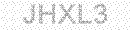
All you need to do is to add a parameter
ImgType=2
into the captcha image call.
It's nice to have a fine border around it:
Just change the style to
style="border:1px solid #CCCCCC;"
So your captcha image call could look like this [change the id to your own]:
<a href="https://www.SnapHost.com/captcha"><img alt="Web Form Code"
style="border:1px solid #CCCCCC;"
src="https://www.SnapHost.com/captcha/CaptchaImage.aspx?id=code&ImgType=2"
/></a>
Add "From" email address
This option allows you to use email address provided by your visitor as the "From" email address.
However, if your visitor entered incorrect email address the message will not be sent.
For visitor's email address specify both "id" and "name" as "FromEmailAddress". For example:
<input type="text" id="FromEmailAddress" name="FromEmailAddress" value="" />
We verify "FromEmailAddress" field on the server-side
however we recommend to validate it with a client-side JavaScript before submitting to the server.
Hide your email address from spiders
Spider is a special software which scans HTML pages and collects email addresses.
Spiders are usually looking for
@ symbol because this symbol always exists in an email address.
By altering this symbol we can "fool" most spiders.
In the
skip_WhereToSend field change
@ symbol to
[[]] symbols.
For example, if your email address is
someone@somedomain.com then you can change it to
someone[[]]somedomain.com
Our form processor will understand that it is your email address.
Note: this change can be done within the "skip_WhereToSend" field only.
Add "Reload Captcha Image" functionality
Captcha image can be reloaded without reloading the whole page.
This becomes useful when visitor is having difficulties reading the Captcha.
Our new code already contains the "Reload" link. However if your form doesn't have it, it is easy to ad:
Add an id attribute to the Captcha image:
id="CaptchaImage"
Add the "reload image" link somewhere close to the Captcha image:
<a href="#" onclick="return ReloadCaptchaImage('CaptchaImage');"><span style="font-size:12px;">reload image</span></a>
And finally add this JavaScript code to the header of your page
<script type="text/javascript">
function ReloadCaptchaImage(captchaImageId) {
var obj = document.getElementById(captchaImageId);
var src = '' + obj.src;
obj.src = '';
var date = new Date();
var pos = src.indexOf('&rad=');
if (pos >= 0) { src = src.substr(0, pos); }
obj.src = src + '&rad=' + date.getTime();
return false; }
</script>
Change the default "From" email address
Some ISP providers require the domain name of outgoing server and the domain name of the sender's email address to match.
To satisfy this requirement, please use this hidden field. It will set the "From" email address accordingly.
You will be receiving your form output as sent by noreply@snaphost.com.
Note that "FromEmailAddress" hidden field has a higher priority over this.
<input type="hidden" id="skip_ServerMatch" name="skip_ServerMatch" value="1" />
Value can be 0 or 1. Use 0 to disable ServerMatch without deleting the hidden field.
Specify "Required Fields"
This option allows you to make some of your form's fields required.
Add the following hidden field:
<input type="hidden" id="skip_RequiredFields"
name="skip_RequiredFields" value="field1##field2##field3" />
As you noticed, fields' names must be separated by ##.
Please change field1, field2 and field3 to your real fields' names, otherwise the form will not work.
If at least one of the fields is empty your visitor will get a message "
field... is required."
To specify your own messages for each required field use the following syntax:
<input type="hidden" id="skip_RequiredFields"
name="skip_RequiredFields" value="field1[[Your custom message 1]]##field2[[Your custom message 2]]" />
You custom messages must be in double square brackets.
Please note that we still recommend to validate your form with a client-side JavaScript before submitting to the server.
Detect your visitor's IP address
To detect your visitor's IP address and send it by email, include the following hidden field:
<input type="hidden" id="skip_ShowUsersIp" name="skip_ShowUsersIp" value="1" />
Value can be 0 or 1. Use 0 to exclude IP detection without deleting the hidden field.
Detect your visitor's Browser and Operating System
To detect your visitor's Browser and Operating System, include the following hidden field:
<input type="hidden" id="skip_ShowUserAgent" name="skip_ShowUserAgent" value="1" />
Value can be 0 or 1. Use 0 to exclude Browser and Operating System detection without deleting the hidden field.
Skip empty fields
If you do not want blank fields to be shown in the email message, include the following hidden field:
<input type="hidden" id="skip_SkipEmptyFields" name="skip_SkipEmptyFields" value="1" />
Value can be 0 or 1. Use 0 to display blank fields without deleting the hidden field.
Separate output information by extra lines
This option is for adding extra lines in between the form's output fields in the email message. It allows you to add 1, 2 or 3 extra lines after each field.
If you want to use this option add the following hidden field:
<input type="hidden" id="skip_AddExtraLines" name="skip_AddExtraLines" value="1" />
Value can be 1, 2 or 3.
If you want us to implement other options please feel free to contact us.