|
|  |
 |
|
FREQUENTLY ASKED QUESTIONS
- 5 most frequently asked questions
- Domain Names
- Getting Started
- More Questions
How reliable is your service?
Connection.
Most hosting companies rent one or two high-speed lines. If these lines are overloaded or unstable, your web site slows down or cannot be reached at all.
We have 6 (!) high-speed lines from different providers that exclude the possibility of your site being down or unstable. If one line is not operational, your web site momentarily switches to another line.
Thus, your site has 6x reliability protection and downtime practically does not exist.
The connection speed provided for each and every one of our lines is at least OC-3.
Equipment.
We host web sites on powerful DELL PowerEdge servers, which are a symbol of stability and reliability in the IT world.
2-4 GB of RAM, 2 processors, and Hard Drives with Ultra3 Wide SCSI interface provide multiple reserves of productivity.
Large RAM provides the opportunity to cache more data and minimizes the number of HD-read-write sessions, which speeds up web sites.
To archive high stability, we duplicate data on mirror hot-plug hard drives.
If one goes down, your web site automatically switches to another one without any interruption in service.
The faulty drive is replaced without restarting the server and without any web site downtime.
Finally, our servers are protected by firewall and antiviral programs to prevent hacker attacks.
Monitoring
Servers are monitored 24 hours, 7 days a week. Servers are equipped with a special performance-monitoring program.
If server productivity decreases to a certain level, this program notifies the administrator.
How do you help to maintain my web site?
Free service:
1. We provide free, unlimited access to any files on the site.
2. To help people find your site, we submit required information to Search Engines.
3. We supply you with your own Guest Book for user feedback.
4. For monitoring and analysis, we provide you with your own statistics server where you can monitor the number of users, where they came from, pages accessed, how many times they were accessed and other useful information.
5. We provide graphic elements and scripts for your site.
6. We assist with advice in web design, Internet programming and Internet advertising.
Paid service:
1. Our highly skilled specialists can design and program your site or Intranet project.
2. We can analyze your web site and create additional pages to improve search engine rankings and attract relevant visitors to your pages.
3. We can set up a promotional campaign to effectively advertise your web site on a pay-per-click or pay-per-impression basis.
How do I pay for web hosting?
You can pay with credit card (VISA, MasterCard, AmEx), check or Money Order.
When paying with credit card, you can select any Billing Cycle from one month to one year.
Payments made by check or Money Order are only accepted for a one-year term.
Regardless of the type of payment, if you prepay for a one-year term you will receive the 13th month free.
You can also pay with PayPal or Western Union. These also assume prepayment for a one-year term.
Do you provide statistics?
For monitoring and analysis, we provide you with your own statistics server where you can monitor the number of users, where they came from, pages accessed, how many times they were accessed and other useful information. The statistics server is accessed via a simple browser, so you do not have to load and process log files.
Based on your web site statistics, you can see the most popular pages and adjust or remove pages that are less frequently visited. You can also use the statistics server information to optimize your advertising dollars.
How do I set up email for pop3 and IMAP?
You can set up your email accounts in any mail client.
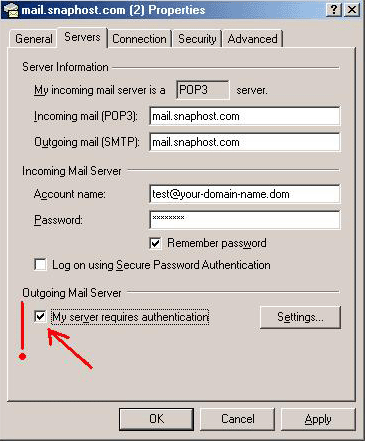
Here is the step-by-step description for setting up your email account in Outlook Express (Outlook):
1. Go to Tools - Accounts - Add - Mail.
2. Type in the name that you want people to see when they receive a message from you.
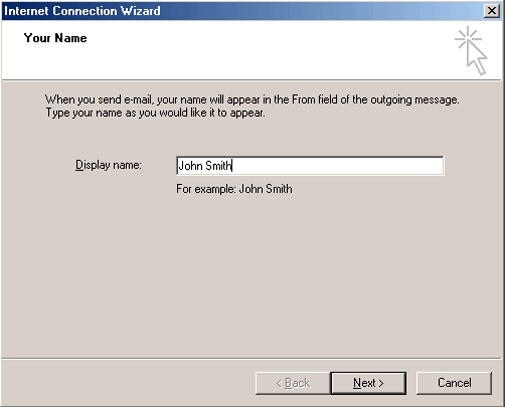
3. Type in the email address that you want to add (i.e.test@your-domain-name.com)
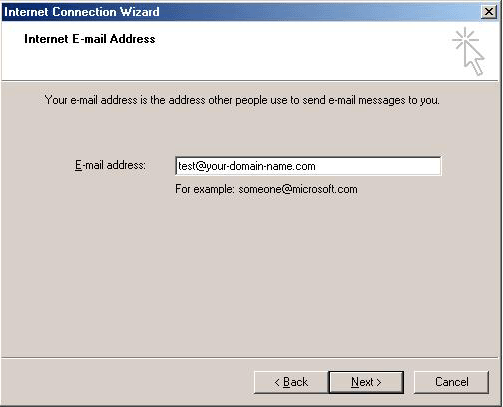
4. Incoming and Outgoing mail: type in mail.snaphost.com.
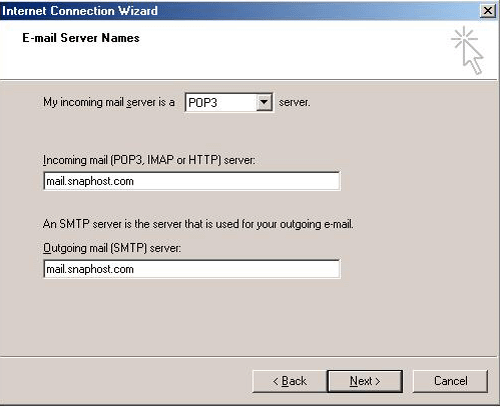
5. Type in the account name: test@your-domain-name.com, and the password that you have created for this account in the Web Email Interface.
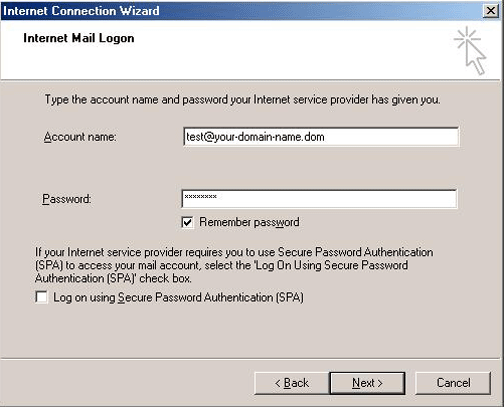
6. Click "Finish" button.
7. Go to Account - Properties - Servers, check the box "My server requires authentication".
|
|